


 24
24
If a client receives damaged products or products are missing due to damage to the packaging, a claim needs to be filed right away.
Per our policy, the client must notify us within 10 days of receipt, and provide photographic/video evidence of damaged or missing items, otherwise a replacement will not be honored.
NOTE: If notified within 10 days, send the client a replacement for the missing and/or damaged product(s). We don't replace the full order, only damaged/missing product(s).
IMPORTANT: Ask the client to keep the damaged packaging.
- USPS may ask the client to bring the package into their local USPS location.
- UPS requires this, otherwise you are not able to file a claim.
We no longer file claims if the initial package is marked as “Delivered” but the client reports never receiving. These claims are always denied.
USPS doesn't accept claims on First Class Mail, UNLESS the package has insurance.
***The Shipping Clerk is responsible for filing and following up on all Claims***
USPS:
- Go to USPS.com
- Login with the login info found in the Orders LP Account
- Under the Help tab, Select filling a claim
- Under File your claim, select start an online claim
- Enter the Tracking number for order
- Fill out form - Under same claim, each item individually (must be same tracking number)
- In uploads, include any photographic evidence of damage. On occasion, USPS will put damage notes on the package. Get these from the client (if any) and also add to the claim. USPS also wants proof that the item was purchased and paid for, so you need to include the client’s Order Summary from ShipStation.
- There is a Desktop file named USPS claims.
- Start a new folder for the client’s claim in here and save the photos submitted to USPS in this folder.
- Include any claim info or ID on the HF ticket as well as any updates you receive.
- Update Claims Trello Card
USPS almost always denies the claim initially. If this happens then file an appeal.
On our USPS account, you are able to see the status, however if claims are denied, online does not state the reason or what additional info is needed for approval.
They are supposed to send a letter detailing why and what info you should send to file an appeal.
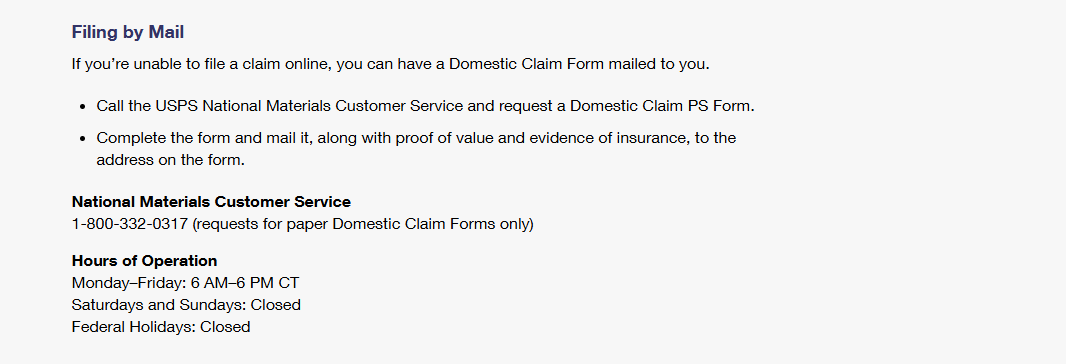
Often enough the online claims system does not work and we need to request a paper form and file by mail. This is for Domestic ONLY:
UPS:
- Go to UPS.com
- Scroll to the bottom of the page
- Click on File a Claim
- Click on View Existing Claim to follow up with current claims
- Click on Start a Claim
- The claim process is the same for lost and damaged packages.
- When asked, What problem are you trying to report, choose accordingly
- If the client didn't save the package, UPS will not accept a claim and you are not able to move forward with your submission
- Ask the client to keep the damaged packaging NOTE: UPS will not accept claims if we don't have the damaged packaging.
- Follow the prompts to submit the claim.
- Include any claim info or ID on the HF ticket as well as any updates you receive
- Update Claims Trello Card
For missing international orders where customs has been paid in advance, customs will not be automatically reimbursed when a UPS claim is filed or closed in our favor. Call the UPS Canada line and request a dispute as soon as possible as it takes them 3-4 weeks to dispute the charges with the government.

